Since Windows 11 24H2, BitLocker’s recovery screen can show a masked Microsoft-account hint when a recovery key has been saved to that account. I went looking for where Windows stores it. It is in plain volume metadata, readable from a disk image without unlocking the drive.
In January 2026, Forbes reported that Microsoft supplied BitLocker recovery keys to the FBI after a search warrant in a Guam fraud case involving three laptops. Microsoft said it provides keys in response to valid legal orders when it holds them. Nothing was broken here; someone else was simply holding the key.
For law-enforcement readers: preserve the full recovery-key identifier and include it in your request to Microsoft. It uniquely identifies the recovery-password protector. The account hint helps you match accounts you have lawful access to; it is not a substitute for the full identifier in the request.
The clue on the recovery screen
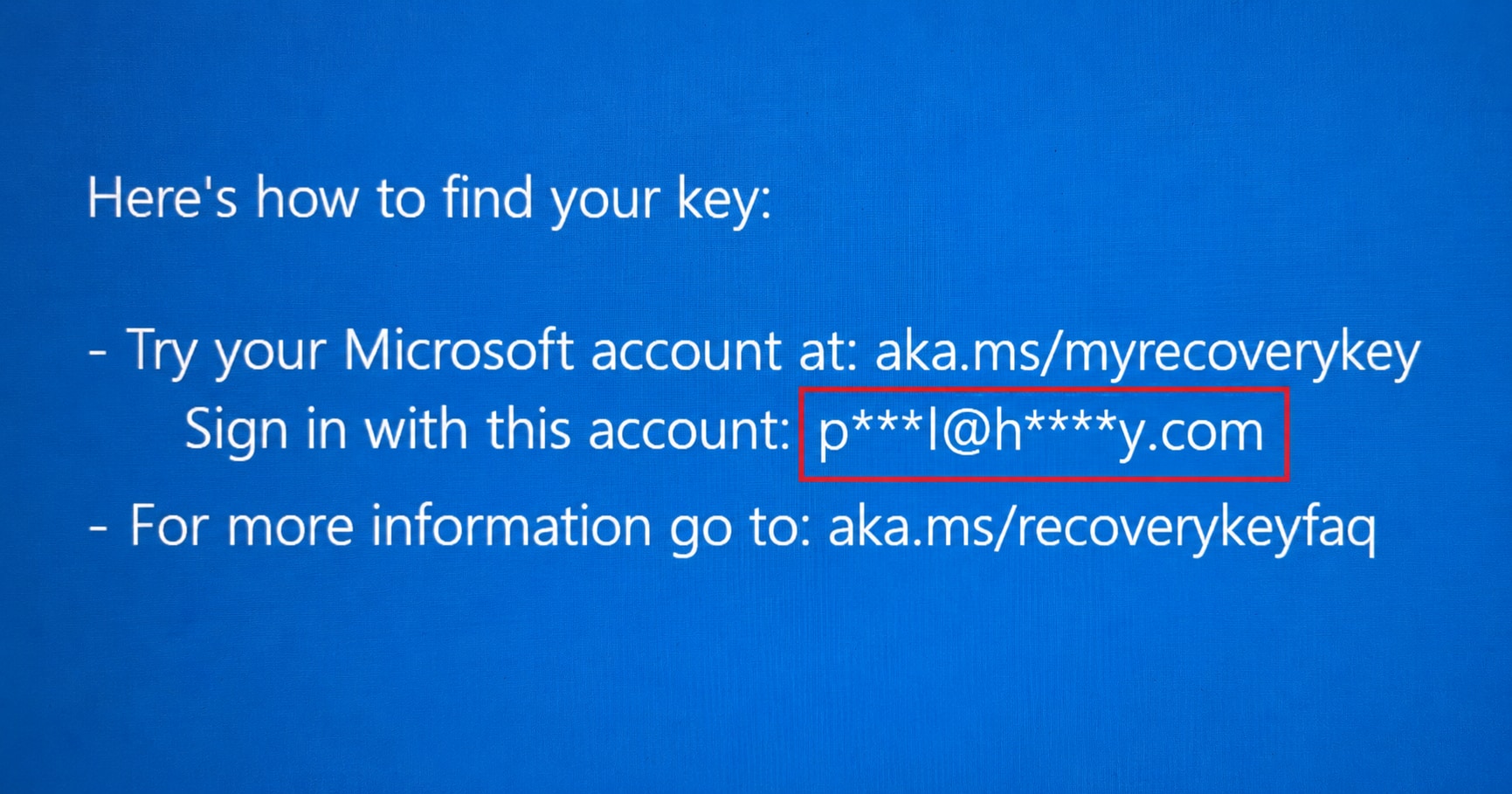
Microsoft documents the hint in its preboot recovery guidance. On my own test machine, a masked version of my address was staring back at me before I had unlocked the volume.
Windows stores the hint outside the encrypted key payload. My tests confirmed it can be read from the stored metadata without unlocking the volume’s contents: an account clue available during an offline examination.
What you can read from a locked volume
The records belong to a specific recovery-password protector, the one associated with the familiar 48-digit recovery key. Together, they can provide:
- A masked account hint, when present.
- The full protector GUID.
- Recorded backup destinations: Microsoft account, Entra ID, Active Directory, save-to-file and print.
- Status flags and timestamps for each category.
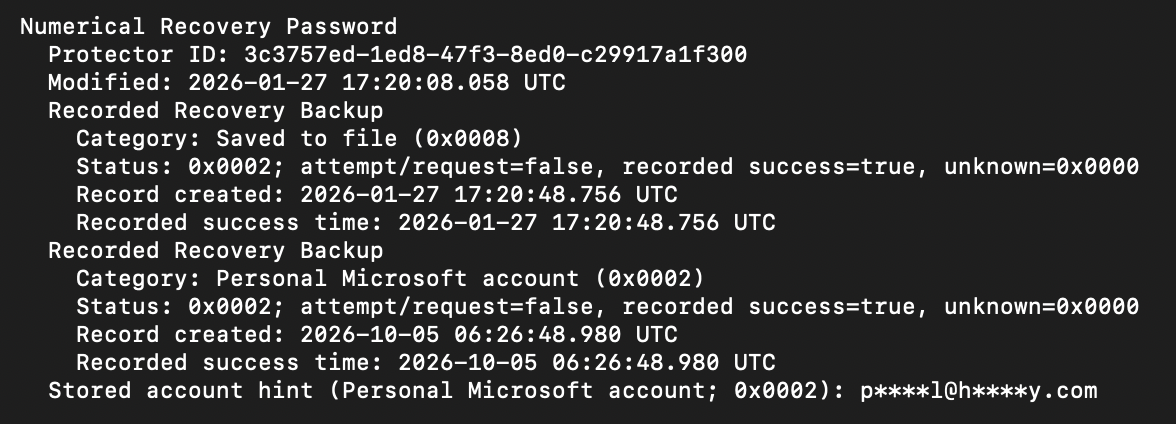
Keep the full GUID in your report. Our tooling displays it in full; Microsoft’s recovery guidance uses the first eight characters to help match an account entry.
Three things to check
A destination is not proof of success
The cloud callers I examined disable pre-upload attempt recording: they record a backup only after the upload reports success. That is a record of a past backup, not the account’s current contents: the user may later delete the key from their Microsoft account. Check this lead before reaching for the soldering iron.
The hint and timestamp can move separately
Windows can update the account hint while skipping a repeat status update. A new hint can sit beside an older recorded success time. Don’t treat them as a matched pair when building a timeline.
“Printed” might mean a PDF
Microsoft Print to PDF and a physical printer use the same category, with no printer name or output path stored. On a fresh Windows installation, a physical printer may not yet be configured. Print to PDF offers a convenient workaround when BitLocker refuses to save the key file to an encrypted drive. Look for a PDF on the desktop, in a sync folder or on another device.
For the defenders in the room
Personal-account backup on a corporate laptop puts a recovery key outside the organisation’s managed process. Ask where keys are backed up, who controls those accounts and who can access the copies. Volume metadata provides local evidence of backup handling; compare it with your managed recovery records.
To rotate a recovery password, use Microsoft’s manage-bde in an elevated Command Prompt. Note the old recovery-password IDs, then add a replacement:
manage-bde -protectors -get C: -type RecoveryPassword
manage-bde -protectors -add C: -RecoveryPassword
Back up the new password to your organisation’s recovery store and verify it can be retrieved. Only then remove each old recovery-password protector by its ID:
manage-bde -protectors -delete C: -id "{OLD-GUID}"Protector rotation does not re-encrypt the data; older disk images may still accept the old password.
Where the public tools stop
I checked Dissect and dislocker source on 4 October 2026. Dissect reads the backup record, including its category, timestamps and flags, but the inspected revision has no account-hint parser. The dislocker revision parses neither record. As far as we have seen, public tooling does not yet surface the account hint.
Alongside TPM-bus attacks, we cover key custody, recovery paths and the evidence they leave.
How I looked at this
I traced the BitLocker user-mode code into the kernel driver’s metadata write path, then tested the print workflow and account-hint recovery on my own system. The component versions and implementation details are below.
My related dislocker issue from 2022 concerned tools accepting different recovery-material formats. This is the same practical question, a few years on.
Part 2: The record, bit by bit
Where the hint comes from
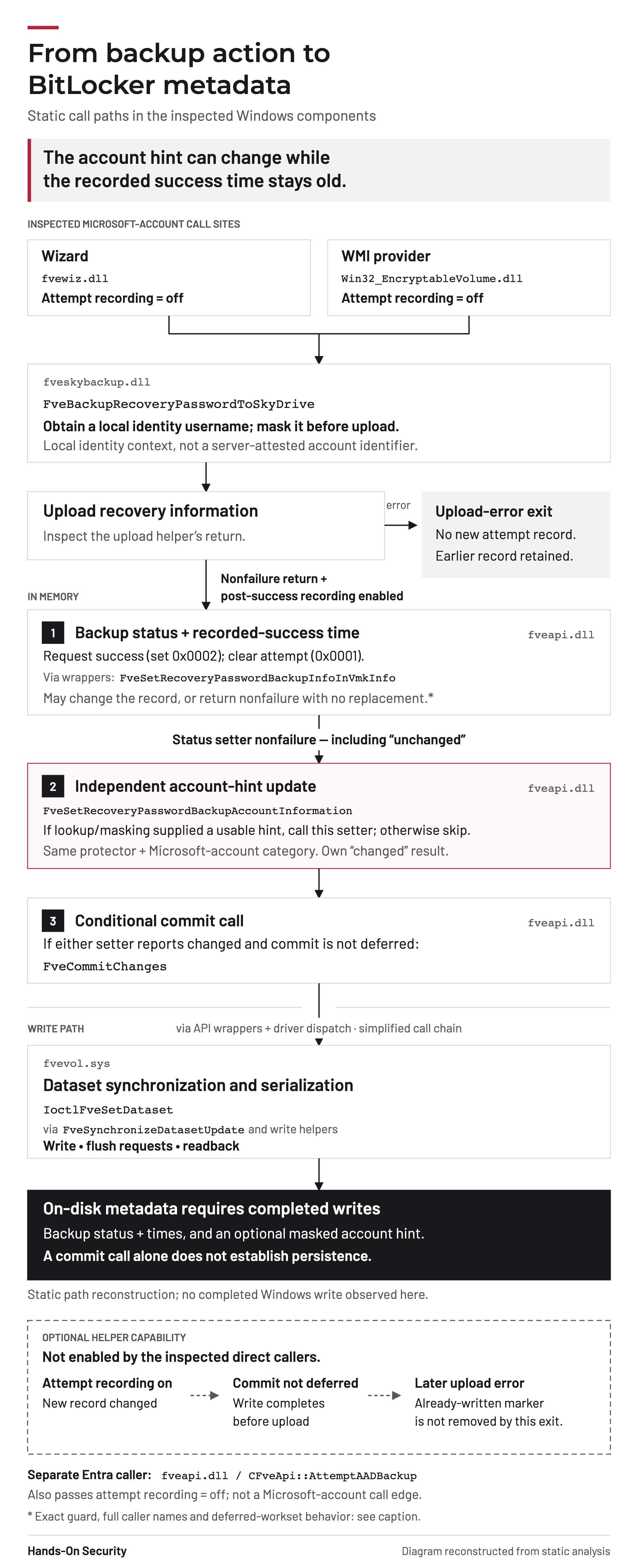
Windows obtains a username from the local identity system through PKEY_Identity_UserName and masks it before upload. After the upload reports success, the recording path can store that text against the same protector and Microsoft-account backup category.
It is the local identity string, not an account ID returned by Microsoft’s server. Windows stores the masked text, not the full address. An update replaces the existing hint for that category. The Entra helper I inspected records backup status but does not call the account-hint setter.
Status bits
The helpers use 0x0001 as an optional attempt marker. After a successful upload, they request success, 0x0002, and clear the attempt bit. If attempt recording is enabled and a new record is written before upload, an ordinary upload-error exit leaves that record in place. The direct callers I examined do not enable this branch.
With deferred writes, a borrowed workset can leave a memory-only change for its owner to commit later. A helper-owned deferred workset is closed before upload without writing the attempt record. A disk record requires a completed write.
A failed retry preserves an earlier success-only record. The validator accepts both bits set, 0x0003, but the inspected cloud transitions do not produce it from the normal states. It does not mean “success followed by a failed retry”.
The category reader includes records without the success bit, so a listed destination needs its status checked.
Two timestamps
Both use Windows FILETIME: 100-nanosecond units since 1 January 1601 UTC.
- Current record created: set when the category record is created and kept through updates. Deleting and recreating the record resets it.
- Recorded success time: set when a success update is applied. It can be older than the latest upload. Zero means no success time was recorded.
The timestamp-update rule
For an existing record, a success update leaves the whole backup-information record unchanged when all these conditions hold:
- No currently set flag is requested to be cleared.
- The previous recorded success time is nonzero.
- The current time is not later than the previous time, or is less than
864000000000ticks (24 hours) later.
At exactly that interval, the check permits the update. New records and requests clearing an existing set flag bypass it, including the cloud transition from attempt to success. The rule is category-independent and skips the whole backup-information replacement. Uploads and the separate account-hint update can still proceed.
Print category
The print handler uses category 0x10 without checking the printer type. A print result does not establish that the paper or PDF was retained. Printing and writing metadata are separate steps: Windows can report a successful print even if the later metadata commit fails. Where policy allows, Print to PDF also provides a setup workaround when Save to file rejects an encrypted destination.
Caller names
- Wizard:
CFveuipManagerWizardData::SavePasswordCloudAccount - WMI:
CWin32_EncryptableVolumeProvider::BackupRecoveryInformationToMicrosoftAccount - Entra, a separate path:
CFveApi::AttemptAADBackup
Components examined
| Component | Role |
|---|---|
manage-bde.exe |
Command-line front end |
fveapi.dll |
Backup/account readers, setters and metadata updates |
fveapibase.dll |
Base-API backup-record reader |
fveskybackup.dll |
Personal Microsoft-account and Entra paths; account-name masking |
fvewiz.dll |
Save to file and Print handlers |
Win32_ |
WMI provider and caller arguments |
win32_ |
WMI method schema |
fvevol.sys |
Kernel-side validation, serialization and metadata I/O |
The six user-mode binaries report 10.0.26100.9278; fvevol.sys reports 10.0.26100.9444. These are component file versions. The MOF supplies the WMI schema.
From backup action to metadata
Open the full-resolution diagram
References
- Microsoft Learn: BitLocker preboot recovery screen
- Microsoft Support: Find your BitLocker recovery key
- Microsoft Learn: BitLocker recovery process
- Thomas Brewster, Forbes, 23 January 2026: Microsoft Gave FBI Keys To Unlock Encrypted Data
- Dissect parser, revision 0b3caf2
- Dissect record and category definitions, revision 0b3caf2
- dislocker datum definitions, revision 0706462
- Pascal Gujer, dislocker issue 294, 28 October 2022